Conjugation tables
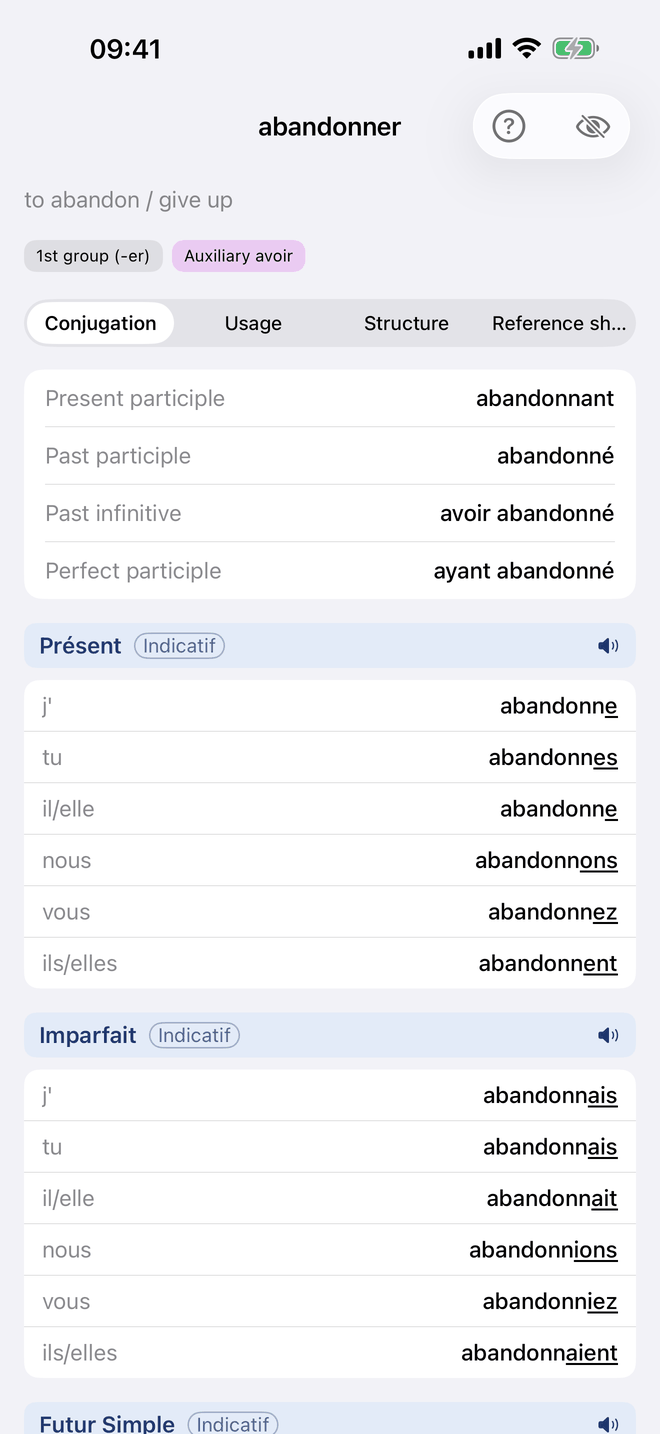
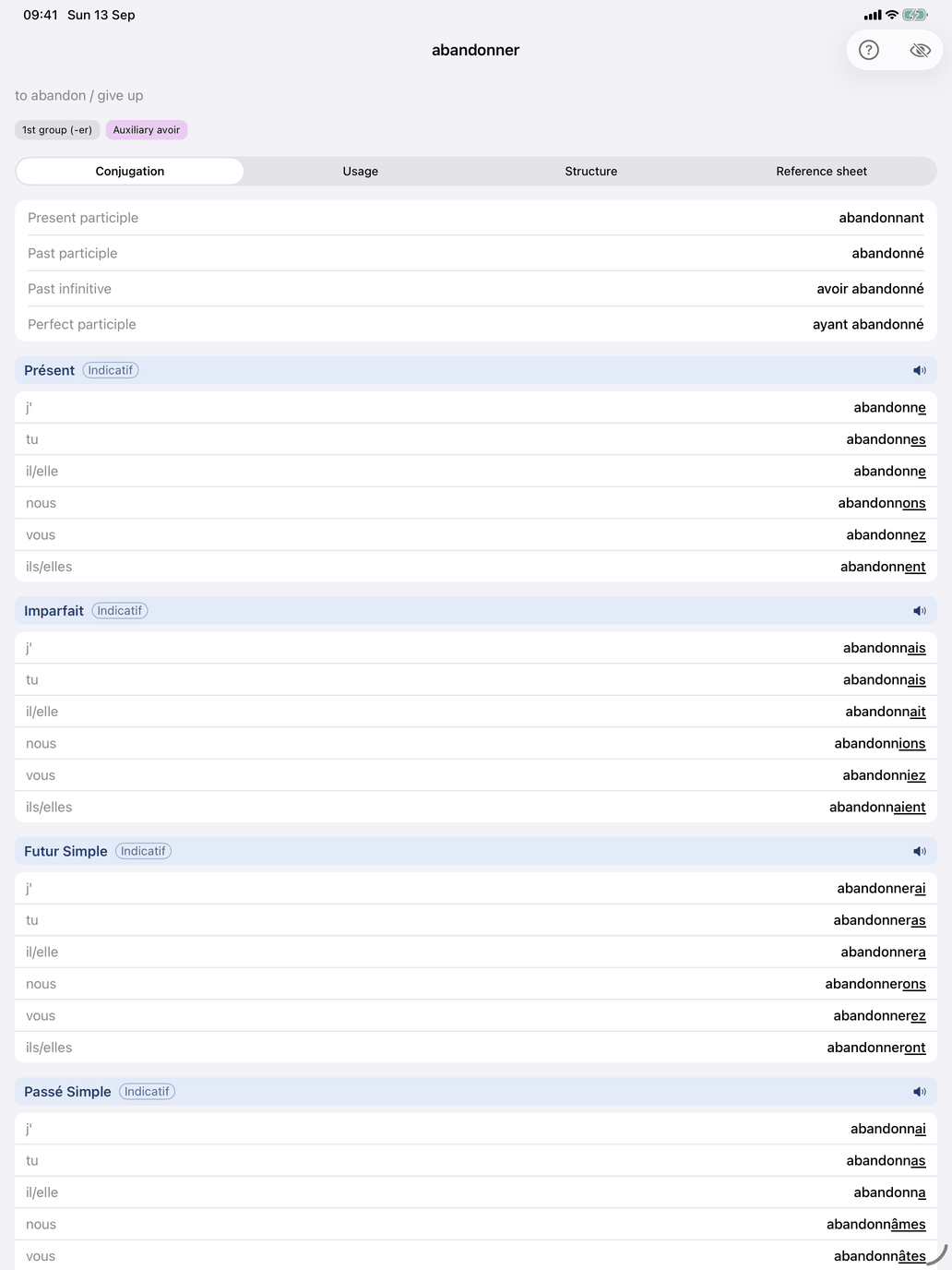
Tap any verb in Verb reference to open its page. The same page opens from a verb group's Browse all verbs list and from Look up. The verb's infinitive is the title.
The header
Above the tabs you see what the verb means and what kind of verb it is:
- the translation of the infinitive (on the Mac, beside the infinitive in the title bar);
- Extended meaning, folded away — for a verb with several distinct senses, a numbered list of them. It goes with the translations: a scheme that shows none hides it too;
- the verb's level, beside the group badges: the verb groups it belongs to, such as 1st group (-er), Stem e → è (achète) or Auxiliary être. They are coloured by section: grey for Basic, blue for Spelling, red for Stem Changes, purple for Auxiliary, orange for Fully irregular and mint for Subjonctif irrégulier. Tap a badge to open the group's card, with its explanation, a worked example and Browse all verbs with the number of verbs in the group. In that list a verb family is one row — prendre with +N for apprendre, comprendre and the others built on it; tap the row to see the family.
- for a verb built on another — revenir on venir, prédire on dire — a family note: "Belongs to the family of dire, with interdire, maudire". Where the verb departs from its base the note says so, form by form: prédire follows dire except in vous prédisez, not vous prédites. On the base verb the note lists the members, and adds "Learn this verb and you have them all" when none of them departs, as on venir.
Below that are three tabs: Conjugation · Regularity · Reference sheet. The page opens on Conjugation.
Conjugation
The Conjugation tab starts with a card of the non-finite forms: Present participle, Past participle, Past infinitive and Perfect participle (parlant, parlé, avoir parlé, ayant parlé). Below it comes one table per tense, for the tenses of your level. If your level has none, the tab tells you so. Each table is headed by its tense and mood and lists the persons with their forms. Under the tense's name a line says what the tense is for, and under the table is the verb's own sentence in that tense, with its translation and a speaker button. On its header, the book icon opens that tense's theory — when it is used, how it is formed, its endings — and the speaker icon reads the whole tense aloud. The forms are marked as described in The conjugation colour code (French).
By Tense / By Person. A picker above the tables switches the view. By Tense shows one table per tense, as above. By Person turns them around: one panel per person — je, tu, … — listing that person's form in every tense, with the tense name above each form, so you can follow how one person's ending changes from tense to tense. The mood is named where it changes. The speaker on a panel reads that person through all the tenses. The choice is remembered across verbs.
Only irregular tenses. The filter button in the toolbar shows only the tenses where this verb departs from the pattern. The choice is remembered across verbs, and per device. While it hides tenses, a note above the tables says so — "Only irregular tenses: 4 of 16 shown." — with Show all tenses to switch it off.
Why a tense departs. Under the table of a tense where the verb departs is a fold-out, labelled with the verdict — Partly irregular, Regular endings, changed stem. Open, it gives the reason in a sentence, the stems the tense is built on (a stem to learn in amber), and for each person that departs the form the pattern predicts, struck through, beside the real one.
Pronominal verbs are shown with their pronoun (je me lève). In the affirmative impératif the pronoun follows the verb (lève-toi). Impersonal verbs such as falloir and pleuvoir are conjugated only in the il form.
The eye button in the toolbar shows a translation under every conjugated form. French has written translations for almost every verb. For verbs with a second meaning, a second button switches all the translations on the page to that meaning. The book icon in the toolbar looks the verb up in online dictionaries.
Regularity
The tab starts with a card of facts about how the verb is built: its Auxiliary (avoir, être, or avoir / être with the note "with a direct object → avoir") and, for a verb with se, its Form (pronominal).
Regularity answers one question: where does this verb depart from the regular pattern? It lists only the tenses where it does, in the usual tense order. Each row has a coloured dot and a verdict: Regular endings, changed stem, Regular endings, learned form, Partly irregular, Irregular or No regular pattern. Under a partly irregular tense, the persons that depart are listed.
Under each tense is the stem it is built on. A stem you have to learn, such as viendr- for the future of venir, is in amber. So is a single form that carries a whole tense, such as the participle pris for the compound tenses of prendre. That is why those compound tenses read Regular endings, learned form: the auxiliary is regular, and the participle is the thing to learn. The two colours answer different questions. Amber on Regularity names a whole stem or form to memorise; red on Conjugation marks the letters of one form that departed.
A last line names the tenses that follow the pattern (Regular in the other tenses: …); a verb with nothing to learn shows only Regular in all tenses. Tap a tense to go to it on Conjugation, with its explanation open under the table.
Reference sheet
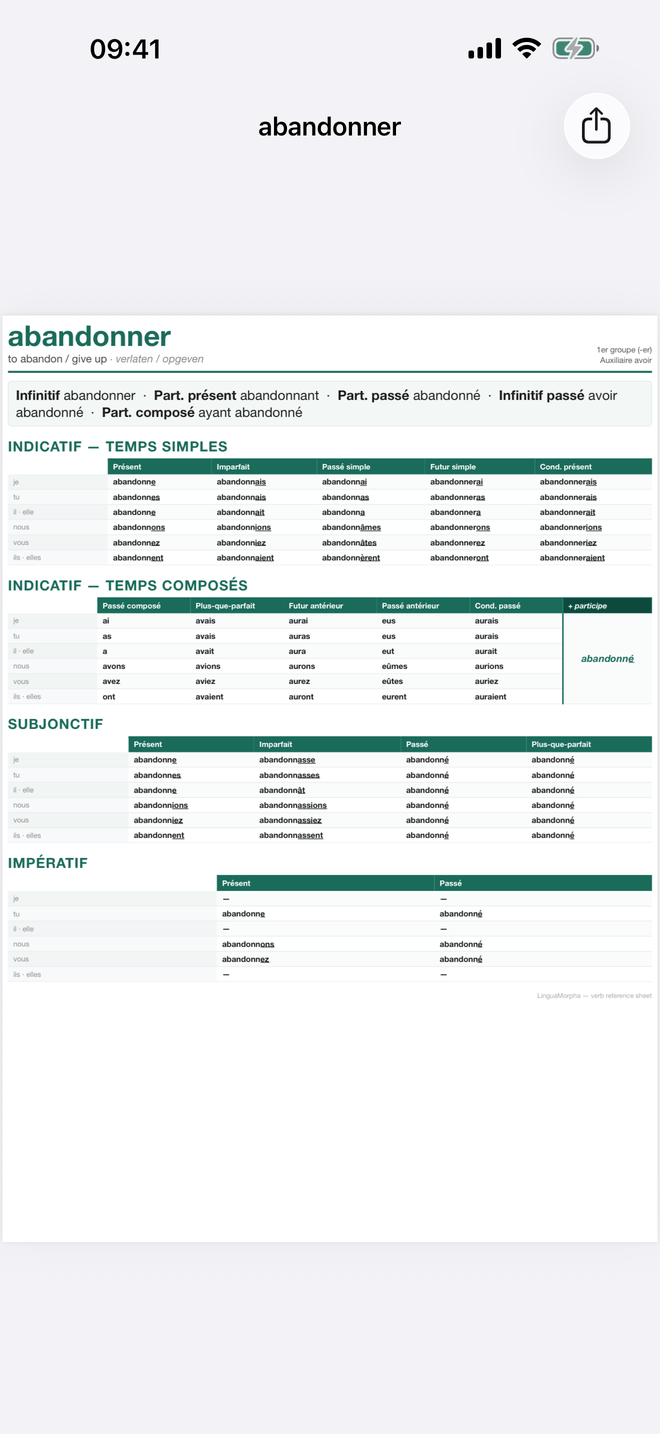
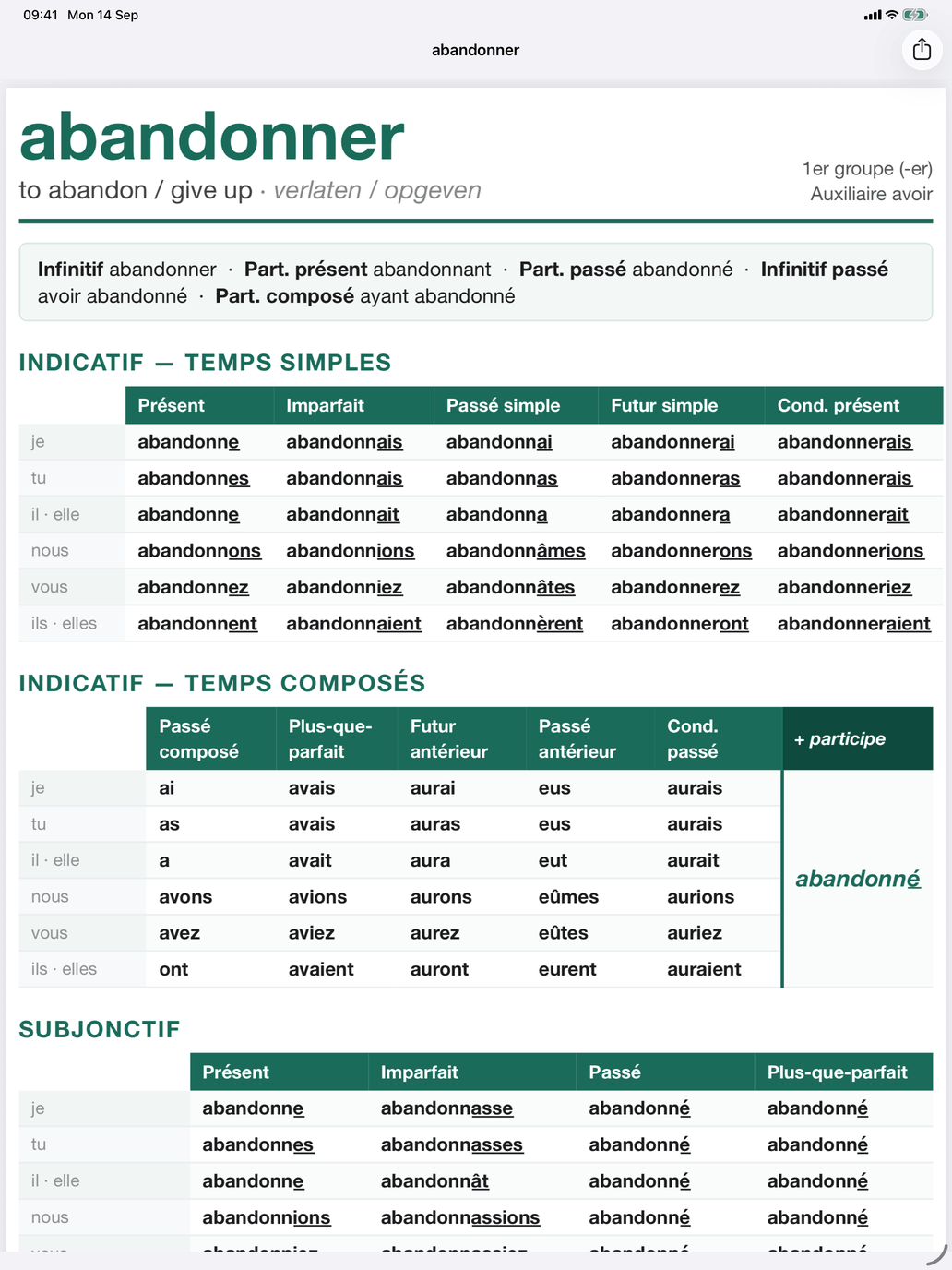
Reference sheet is a printable one-page PDF of the verb in every tense, whatever you have selected, with the same marks as the tables. Its header gives the verb's group and auxiliary. The sheet lists the non-finite forms, the simple and compound tenses of the indicatif, and the subjonctif and impératif side by side. The compound tenses show the auxiliary's forms with the participle once beside them. On iPhone and iPad, the share button sends, saves or prints the sheet; on the Mac, the toolbar menu offers Copy and Save as….
Regular patterns
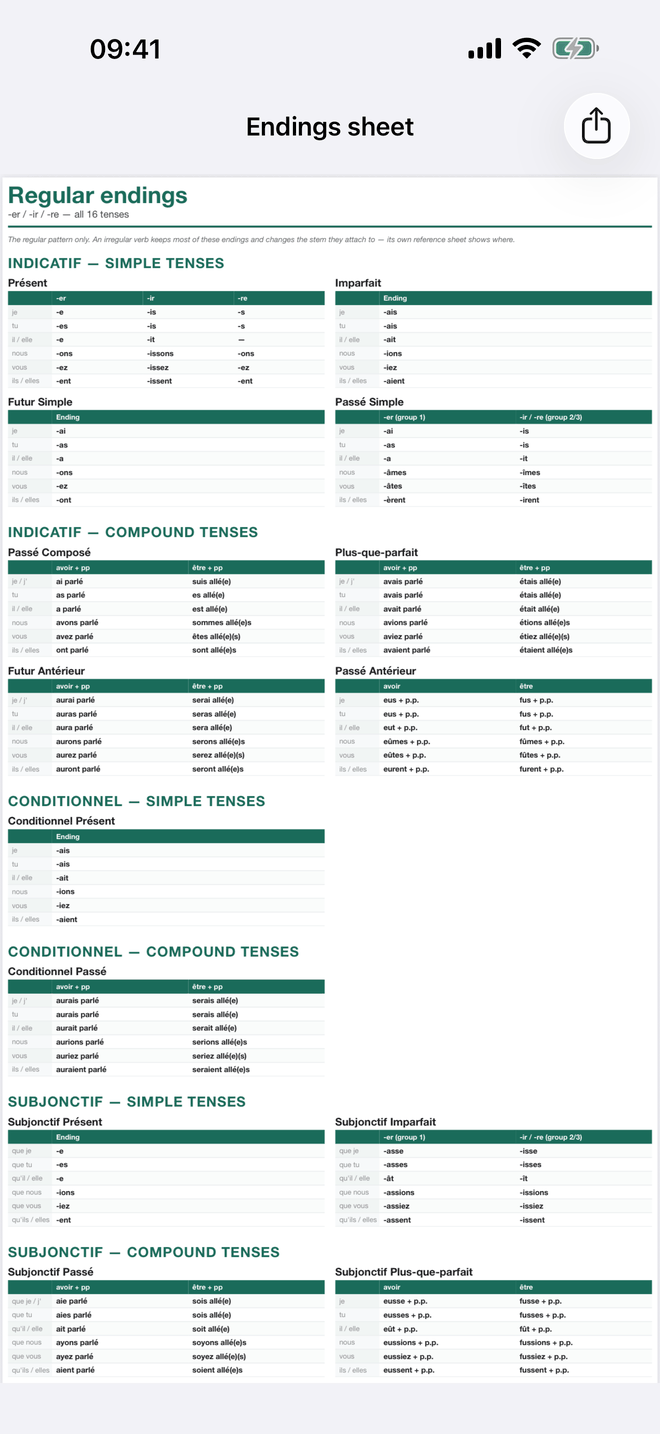
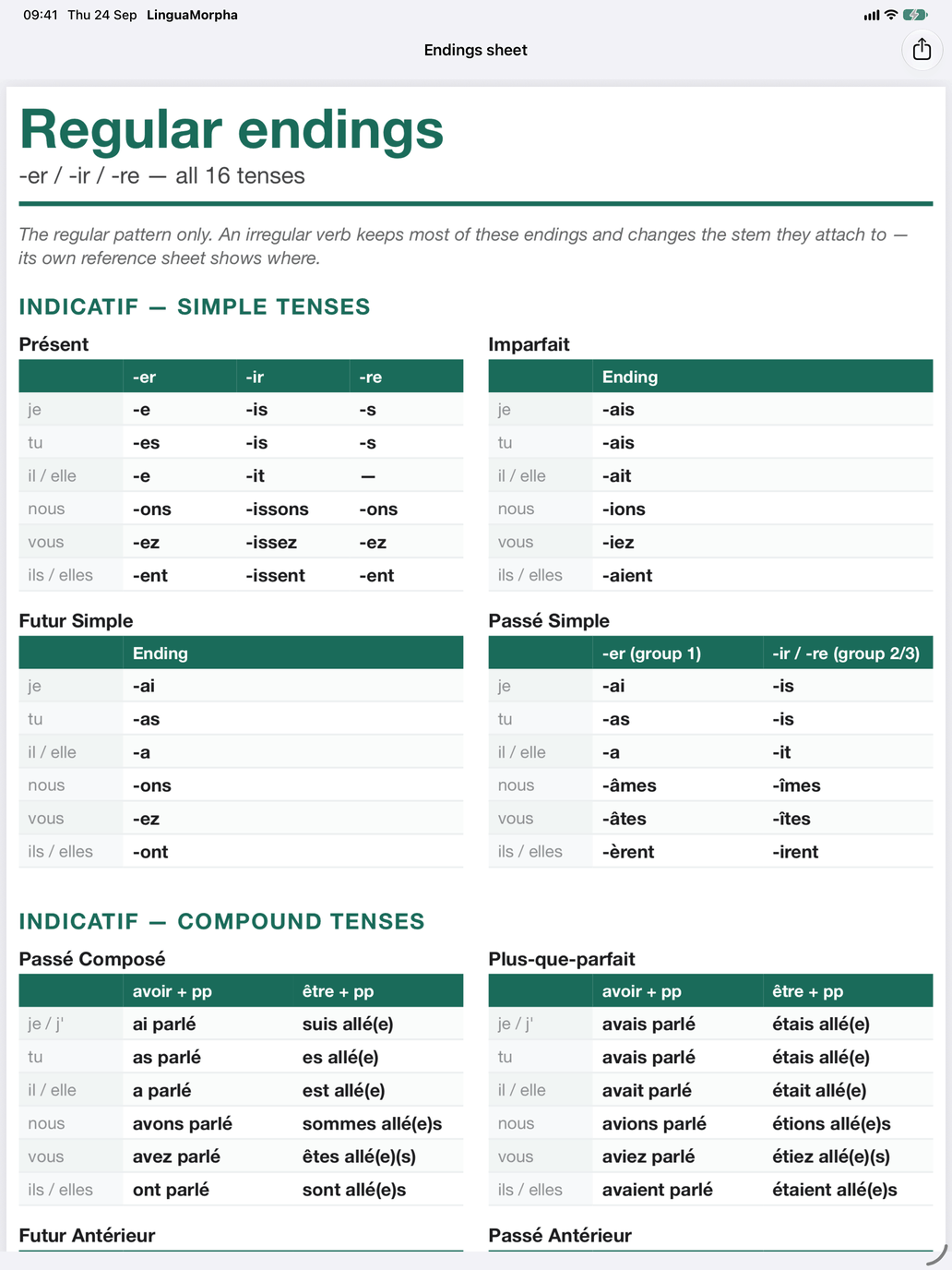
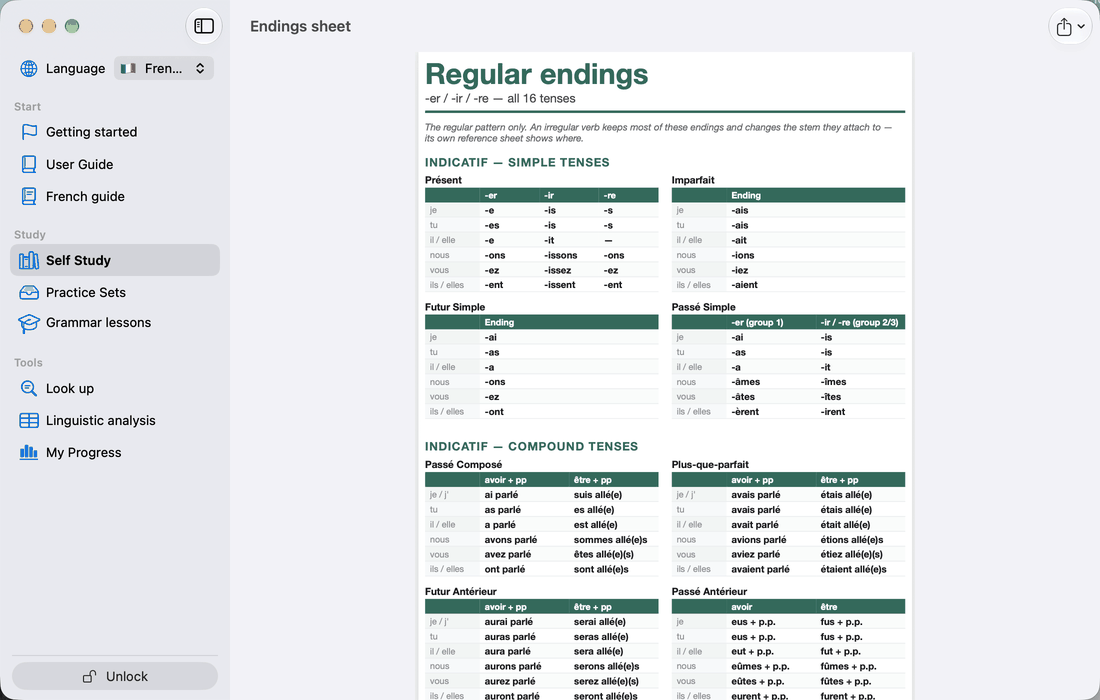
Regular patterns, at the bottom of the Verb groups page under To print, is the other printable page: the regular endings of all sixteen tenses at once, grouped by mood — indicatif, conditionnel, subjonctif, impératif — with the simple tenses before the compound ones. A simple tense gives its endings per group, -er, -ir and -re where they differ and one column where they agree; a compound tense gives the auxiliary, avoir or être, with the participle.
It is the regular pattern only. An irregular verb keeps most of these endings on a stem of its own; its Reference sheet shows where. The tables are the ones in the tense cards on Tenses — one tense at a time there, all sixteen here.
Tip: In Produce the conjugation and Recognise the conjugation, once your answer is graded a book icon on the card shows the verb's table for that tense. This is useful right after a wrong answer.